Handwriting Generator
The handwriting generator that writes in your own hand
Most "handwriting" tools just hand you a font. Every letter comes out identical, the baseline is dead flat, and anyone can tell at a glance. ScribbleSync works from letters you draw yourself, so the page actually looks like you wrote it.
No printer. No scanner. Draw once, reuse forever.
ScribbleSync handwriting generator, at a glance
ScribbleSync is a free handwriting generator that writes in your own hand instead of a font. You draw your letters once, type any text, and export handwritten pages.
- →ScribbleSync builds every page from letters you draw yourself, so repeated letters are never identical.
- →You draw each character once on a phone, tablet, or desktop. No printer or scanner is needed.
- →You type any text and ScribbleSync composes it in your handwriting.
- →You export the result as a PNG, a transparent PNG, or a multi-page PDF.
- →ScribbleSync is free, and a free account saves your handwriting set across devices.
Why generated handwriting usually looks fake
It comes down to one thing: repetition. Here is the same sentence, two ways.
✕A handwriting font

Look at the three e's. They're clones. Same height, same tilt, sitting on a ruler-straight line. No hand on earth does that, and your eye knows it instantly.
✓ScribbleSync
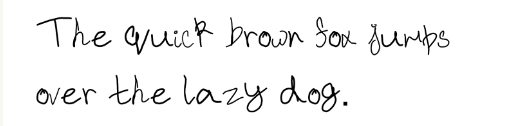
The baseline drifts a little. Letters change size as you'd expect. The line wraps the way it would on a real page. Those tiny imperfections are exactly what reads as human.
We never turn your writing into a font
That's the whole trick, and it's deliberate. The moment a tool bakes your letters into a font file, it freezes one version of each character and stamps that copy everywhere. Consistency is great for a logo. It's the kiss of death for handwriting.
ScribbleSync keeps every character you draw as its own image. When you type, the engine places those images one at a time, with real rules for ascenders, descenders, baseline lift, and per-letter scaling. Nothing gets flattened into a single rigid glyph, so the quirks that make your writing yours survive all the way to the export.
Three steps, then it's yours for good
The first pass takes a few minutes. After that, you just type.
Draw your letters once
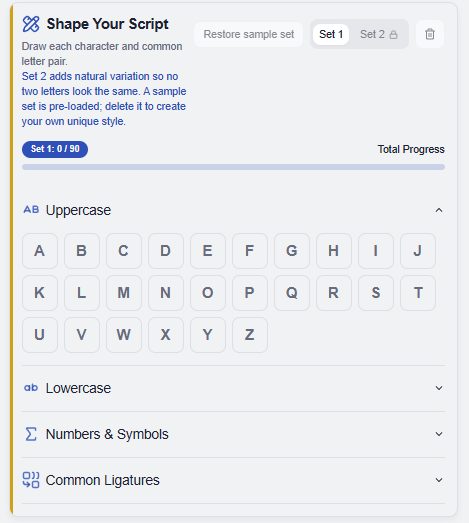
Uppercase, lowercase, numbers, punctuation. Start with the characters you actually use and add the rest whenever. You're drawing straight on the screen, so there's no sheet to print and nothing to scan.
Type whatever you need
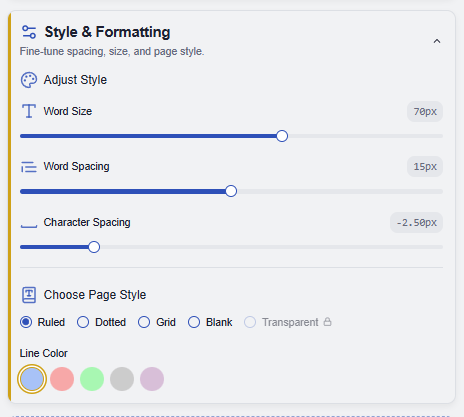
Notes, a journal entry, a card, an assignment draft, paste it in and watch it rebuild in your hand. Tune the word size, spacing, and page background until it sits the way you like.
Export and reuse
Download a clean PNG, a transparent PNG for layering in Canva or Figma, or a multi-page PDF for longer work. Sign in and your whole letter set is saved, so next time you skip straight to typing.
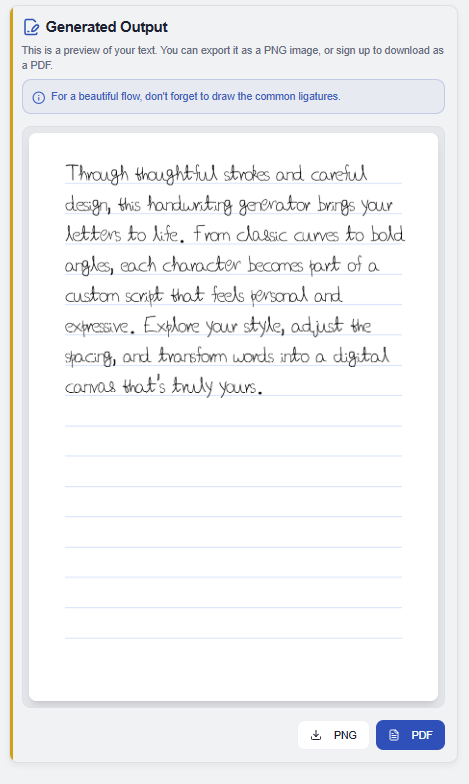
The small thing that sells it: ligatures
In real writing you don't lift the pen between every letter. Certain pairs flow together, and your brain notices when they don't.
- th, in, isthe joins you make without thinking. Draw them once and repeated words stop looking stamped.
- ing, llcommon endings that show up constantly in notes and essays. Saving them keeps line endings loose.
- your ownadd whatever combinations you join in real life. The more you add, the less "generated" it reads.
One handwriting set, all the places you write
Draw your letters once and the same set carries across everything you make.
Assignments and homework
Paste a typed draft and get handwritten pages back, no recopying a finished essay onto paper by hand.
Notes, letters, and cards
Send something that reads like you actually wrote it, because every letter started as one you drew.
Journals and design work
Drop your handwriting into planners, captions, and overlays, exported as a transparent PNG for Canva or Figma.
Why skipping the printer and scanner changes everything
Most handwriting tools still assume the old desktop routine: download a worksheet, fill in every box, scan or photograph it, upload the image, then wait for the software to pick each letter out of the page. It's slow even when nothing goes wrong.
It also assumes you have the hardware sitting there. On a phone or tablet, printing is a chore and scanning adds shadows and distortion, the kind of flattening that quietly erases the small details that make your writing yours.
ScribbleSync skips the whole pipeline. You draw straight on the screen, so the stroke itself is the source. Nothing to print, no scan pass, nothing to upload, and what you save stays close to how you actually write.
Text to handwriting, using your own letters
ScribbleSync is a handwriting maker, a text-to-handwriting tool, and a handwritten assignment maker in one. It does not rely on a generic handwriting font. It builds every result from the characters you draw and save yourself, so the output stays close to your own style.
You can draw your letters on a phone, a tablet, or a desktop. Write with your finger, a mouse, or a stylus or pen, whichever feels natural. However you draw them, ScribbleSync captures your letters and reuses them every time you type.
Questions worth answering
- Is it actually free?
- Yes. Drawing your letters, generating pages, and exporting are free. A free account just lets you save your set and reuse it across devices.
- Do I need a printer or scanner?
- No. You draw right on the screen. Nothing to print, nothing to scan, nothing to upload.
- How is this different from a handwriting font?
- A font stamps one frozen shape per letter, so repeats are identical and the baseline is dead flat. ScribbleSync places each drawn character on its own and keeps the variation in size, slant, and spacing, so it reads as real.
- What are ligatures, and do I have to use them?
- They're common letter joins like th, in, or ing. They're optional, but adding a few is the single fastest way to make output look less mechanical.
- Can I export transparent PNG or PDF?
- Both. Plain PNG, transparent PNG for layering, or multi-page PDF for longer documents.
- Why sign in with Google?
- Only to save your handwriting set to the cloud so you never have to redraw it. You can try everything first without an account.
- Can I make text look like my own handwriting?
- Yes. You draw your own characters once, and ScribbleSync turns any typed text into your handwriting.
- Can I draw A to Z on screen?
- Yes. You draw every letter, number, and supported symbol directly on screen, on a phone, tablet, or desktop.
- Is this a handwriting font generator?
- No. ScribbleSync doesn't make a font. It composes pages from your individual drawn characters, which keeps the variation a font removes.
- Can I download the handwritten result?
- Yes. Download it as a PNG, a transparent PNG, or a multi-page PDF.
Draw it once. Type for years.
Capture your handwriting today and generate clean pages from typed text whenever you need them.