Handwritten Assignments
You already wrote it once. Skip the hand-copying.
The thinking is done and the draft is typed. The slow, cramp-inducing part is copying it onto paper in your own writing. ScribbleSync does that part for you, in your hand, not a generic font.
Type it, style it, export a clean PDF. No printer or scanner.
Handwritten assignments with ScribbleSync, at a glance
ScribbleSync creates handwritten assignments online in your own writing style. You draw your letters once, type your assignment, and export it as a PDF or PNG.
- →ScribbleSync turns typed assignment text into handwritten pages using letters you drew yourself.
- →You draw your handwriting set once on a phone, tablet, or desktop. No printer or scanner is needed.
- →You export assignments as a multi-page PDF for submission, or a transparent PNG for layering over scanned pages.
- →You can set margins, line spacing, word size, ruled or blank paper, and ink color.
- →ScribbleSync is free, and a free account saves your handwriting for every future assignment.
Pages that look written, because they were
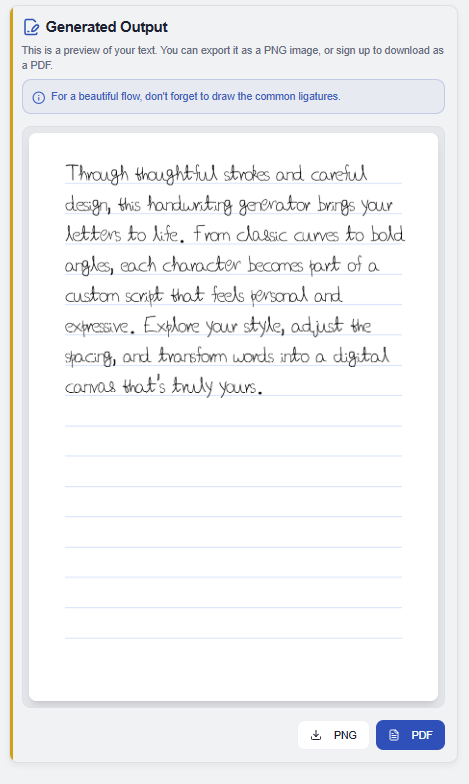
Every character on the page started as a letter you drew. So the spacing breathes, the baseline moves a little, and the same word never lands twice in the exact same shape.
You still set the rules, margins, line spacing, word size, ruled or blank paper, so a ten-page essay stays tidy and consistent from the first line to the last.
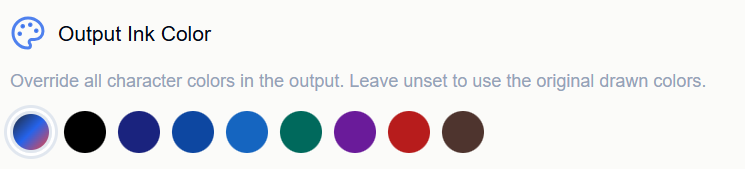
Even the ink is yours to pick. Drew your letters in black but the assignment calls for blue pen? Override the ink color in one tap, or leave it unset to keep the colors you drew with.
From typed draft to handwritten page
Three steps. The first one you only ever do once.
Save your handwriting set
Draw your letters, numbers, and punctuation, plus the joins you use most like th, in, ll, or ing. Sign in and it's saved for every assignment after this one.
Paste your assignment
Drop in your essay, lab write-up, homework answers, or notes. ScribbleSync rebuilds the whole thing from your saved characters while you tweak the layout.
Export how you need it
Multi-page PDF for a full submission, or a transparent PNG when you only want the text to drop onto a scanned sheet. Save it, send it, or print it.
The flexible bit
Transparent PNG isn't just for students
Export with no background and you get just the ink. Layer it over a photo of your own notebook, a worksheet, or a form. Drop it into Canva, Figma, a slide, or a mockup. Sometimes you don't want a whole page, you want your handwriting as a piece you can move anywhere.
Where this genuinely helps
The win is time. You stop re-transcribing work you've already finished, and you keep a consistent, legible version of your own handwriting across long documents, study guides, and notes.
No printer, no scanner
Older handwriting tools assume a printed sheet you fill in and scan back. ScribbleSync skips all of it, you draw on the device you already have, and everything after that is digital until you choose to print.
Built for the way students actually work
The thinking's done and the draft is typed. This is about getting it onto the page without the cramp.
Hours back on copying
Paste a ten-page assignment and it rebuilds in the time it takes to read it. The engine does the writing from your letterforms.
Submission-ready exports
High-resolution multi-page PDF for digital hand-in or printing, or a transparent PNG when you only need the text layer.
Genuinely your hand
Every character comes from a letter you drew, so the page keeps the natural variation a stock font can't fake.
A second character set
Draw a second version of your letters and ScribbleSync varies between the two sets, adding natural randomness so repeated letters and words don't look uniform across a long assignment.
Where students reach for it
- Essays & reportstyped drafts into handwritten submissions.
- Lab reportsa handwritten layer over data and observations.
- Homeworkclear repetitive written work without the manual copying.
- Study notesconsistent, legible handwritten study guides.
Questions worth answering
- Can I make assignments in my own writing style?
- Yes. Draw your letters once, save them, then type any assignment and it comes out in your hand, not a stock font.
- Can I download it as a PDF?
- Yes. Multi-page PDF export gives you complete pages ready to submit digitally or print.
- Can I get just the handwriting with no background?
- After sign in, transparent PNG export hands you the text alone, ready to layer over a scan or a worksheet.
- Do I have to print or scan anything?
- No. It's screen-first the whole way. Print only at the end if you actually need paper.
- Is it only useful for school?
- No. The same flow works for notes, journals, letters, and design assets, but this page is written around assignments.
- Can I convert typed text into a handwritten assignment?
- Yes. ScribbleSync turns typed text into handwritten pages for assignments, homework, notes, and practice.
- Can I use my own handwriting for assignments?
- Yes. Create your handwriting characters once, then generate assignment pages in your own style.
- Can I change the ink color?
- Yes. Override the output ink color, for example black to blue pen, or leave it to match the color you drew with.
- Does it work on a phone or tablet?
- Yes. Draw, type, and export assignments from a phone, tablet, or desktop browser.
New here? Start by building your letters in the handwriting generator.
Need handwriting on a specific notebook page or form? Try handwriting on any page.
Get the assignment done, keep your handwriting
Save your letters once, then turn every typed draft into a handwritten page in minutes.