Typed to Handwritten
Turn typed text into your own handwriting
Handwriting fonts give it away in a second, every "a" is a carbon copy of the last. ScribbleSync uses letters you draw yourself, so the page reads like you actually sat down and wrote it.
Draw once, then type as much as you like.
Making typed text look handwritten, at a glance
ScribbleSync makes typed text look handwritten by using letters you draw yourself instead of a font. You draw once, type your text, and export handwritten pages.
- →ScribbleSync converts typed text into your own handwriting, not a generic handwriting font.
- →You draw each letter once on a phone, tablet, or desktop. No printer or scanner is needed.
- →The engine places your drawn characters one by one, varying size, slant, and spacing so repeats are never identical.
- →You export the result as a PNG, a transparent PNG, or a multi-page PDF.
- →ScribbleSync turns typed text into handwriting. Converting handwriting back into printed text needs a separate OCR tool.
Three ways to do it
They don't all land the same. Here's the honest version.
A handwriting font
Fast, and free everywhere. But it's someone else's hand, and the repetition shows.
Print, write, scan
Authentic, sure. Also slow, and it falls apart the moment you're on a phone with no printer nearby.
✓Your own saved letters
Draw each character once. Type forever. It stays close to how you really write.
What's actually happening under the hood
Each letter you draw is saved as its own little image. Type a sentence and the engine sets those images down one by one, nudging size, slant, and spacing as it goes.
Because nothing is frozen into a single fixed glyph, repeated words don't come out as clones. That's the difference your eye picks up without quite knowing why.
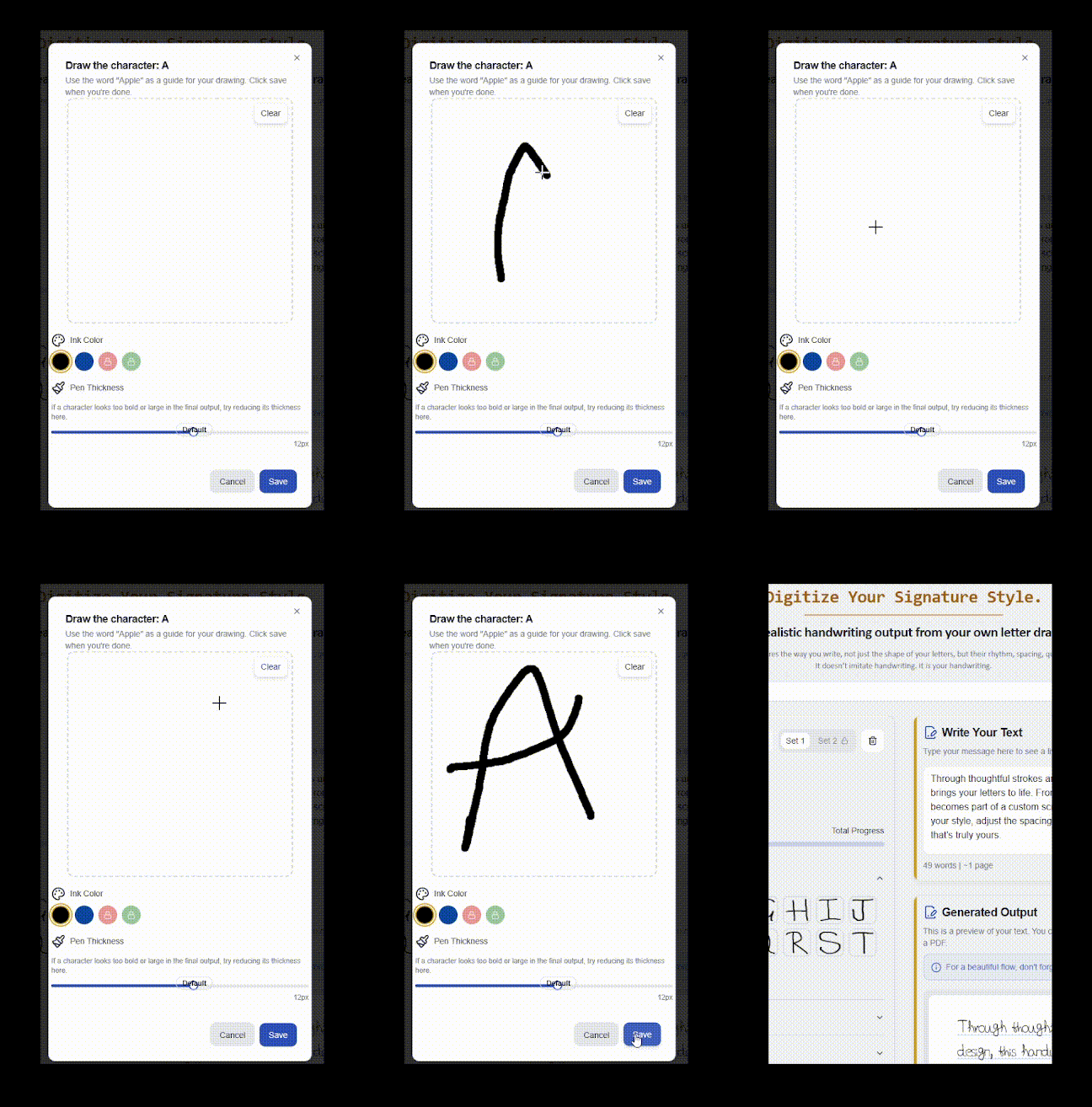
Draw your characters
Letters, numbers, punctuation, and the joins you use a lot.
Type your text
Homework, notes, a caption, a journal entry, whatever you want in your hand.
Export it
PNG, transparent PNG, or a multi-page PDF, depending on where it's going.
Common letter combinations make it read naturally
ScribbleSync supports the pairs you already join without thinking, th, in, is, ll, ing. Saving a few keeps repeated words and endings from looking stamped.
Natural in notes
Common endings and repeated words show up constantly in notes and journals. Saved joins keep them loose.
Cleaner in assignments
Long passages have repeating patterns. The combinations you naturally write together stop them looking rigid.
Ready for reuse
Once saved, your most common joins are there every time you generate a new page, no redrawing.
Make handwriting without a printer or scanner
ScribbleSync makes typed text look handwritten without a printer or scanner. That is the step almost every other tool still gets wrong.
Most handwriting tools were built around paper. They assume you will print a sheet, write on it by hand, scan or photograph it, upload the image, and wait for software to pull the letters back out. It is slow, and it falls apart the moment you only have a phone.
ScribbleSync is built the other way around. You draw your letters once on the device you already have, save them, and generate handwritten pages from typed text whenever you need them. There is no printing step, no scanning step, and no extra hardware, on a phone, a tablet, or a desktop.
If you want to make text look like your handwriting without a printer or scanner, this is the workflow ScribbleSync was made for.
Trying to go the other way? That's a different tool
Some people arrive here wanting to make their handwriting look like clean printed or book text. That's the reverse of what this page does, and it needs OCR, software that reads a photo of your writing and converts it into editable typed text.
ScribbleSync runs the opposite direction: typed text in, your handwriting out. If that's what you came for, you're in the right place.
Questions worth answering
- How do I make typed text look handwritten?
- Draw your own letters once, save them, then type. ScribbleSync builds the page from your saved handwriting instead of applying a font.
- Is this a text-to-handwriting generator?
- Yes. You type, it composes the result from the characters you made.
- Can I use it for assignments or notes?
- Yes. It works for assignments, study notes, journal pages, captions, anything you'd otherwise write by hand.
- Phone or tablet?
- Both, plus desktop. Drawing on a touch screen is a natural way to capture your style.
- PNG or PDF?
- Plain PNG, transparent PNG, or multi-page PDF, your pick.
- Can it make my handwriting look like printed text?
- No, that's the reverse direction and it's handled by OCR tools. This turns typed text into handwriting, not the other way around.
- Can I make my own handwriting by drawing letters on screen?
- Yes. Draw each letter on screen once and ScribbleSync saves it as your handwriting set to reuse.
- Can I create custom handwriting without scanning paper?
- Yes. You draw your letters digitally, so there's no paper to scan and no template to print.
- Is there an app where I write each letter on my phone?
- Yes. ScribbleSync runs in your phone browser, so you draw your letters and generate pages from typed text right there.
Type it. Get it back in your hand.
Save your handwriting once and turn any typed text into a page that looks written, not generated.